


The comparison between Zendesk vs Intercom looks close on a feature sheet, but the gap shows up the moment you use them. One is built to process support requests at volume, and the other is built to hold a conversation before it ever becomes a ticket.
I tried both, compared their pricing, and read through hundreds of user reviews to see where the marketing stops matching the reality.
Two things decide most of these purchases in 2026: how good the AI agent is, and what the bill looks like once you scale.
Zendesk vs Intercom: what's the difference?
Zendesk is a ticketing-first support platform built for structured, high-volume service across email, chat, phone, and social.
Intercom is a messaging-first support platform built around Fin, its AI agent, for conversational, product-led support.
Choose Zendesk if you handle high ticket volume across several channels and want deep reporting, QA, and predictable per-seat pricing.
Choose Intercom if you want an AI agent resolving common questions out of the box and support that feels built into your product.
Meet Zendesk: features and highlights

Note: Zendesk sells several products. For this comparison, I'm focusing on Zendesk Suite, its customer service platform with ticketing, messaging, live chat, and AI agents built in.
Zendesk's workspace leads with the ticket queue and omnichannel view, and that's still where most support teams spend their day.
Beyond the queue, these are the features I'd point a support team toward first:
- Triggers and macros: Automate routine steps like status changes, tagging, and assignment rules, so agents aren't repeating the same clicks on every ticket.
- Omnichannel workspace: Handle email, chat, phone, and social from one ticket view, so agents don't switch tools mid-conversation.
- Side conversations: Loop in another team or an outside vendor inside a ticket, without starting a separate thread somewhere else.
- Zendesk AI: Zendesk AI says its agents can resolve up to 80% of questions autonomously (vendor-reported figure), though real-world results vary by ticket type. Language support runs up to 80+ languages for digital channels (fewer for voice).
- Copilot: A separate AI layer that assists agents directly, with suggested replies, thread summaries, and sentiment flags on incoming conversations.
- Explore reporting: Pre-built dashboards and custom reports on response time, agent performance, and channel load, with some of the deeper reports gated to higher plans.
- Knowledge base: A standalone help center with a full article editor, categories, custom themes, and multilingual support, built to work as its own search-friendly site.
Meet Intercom: features and highlights
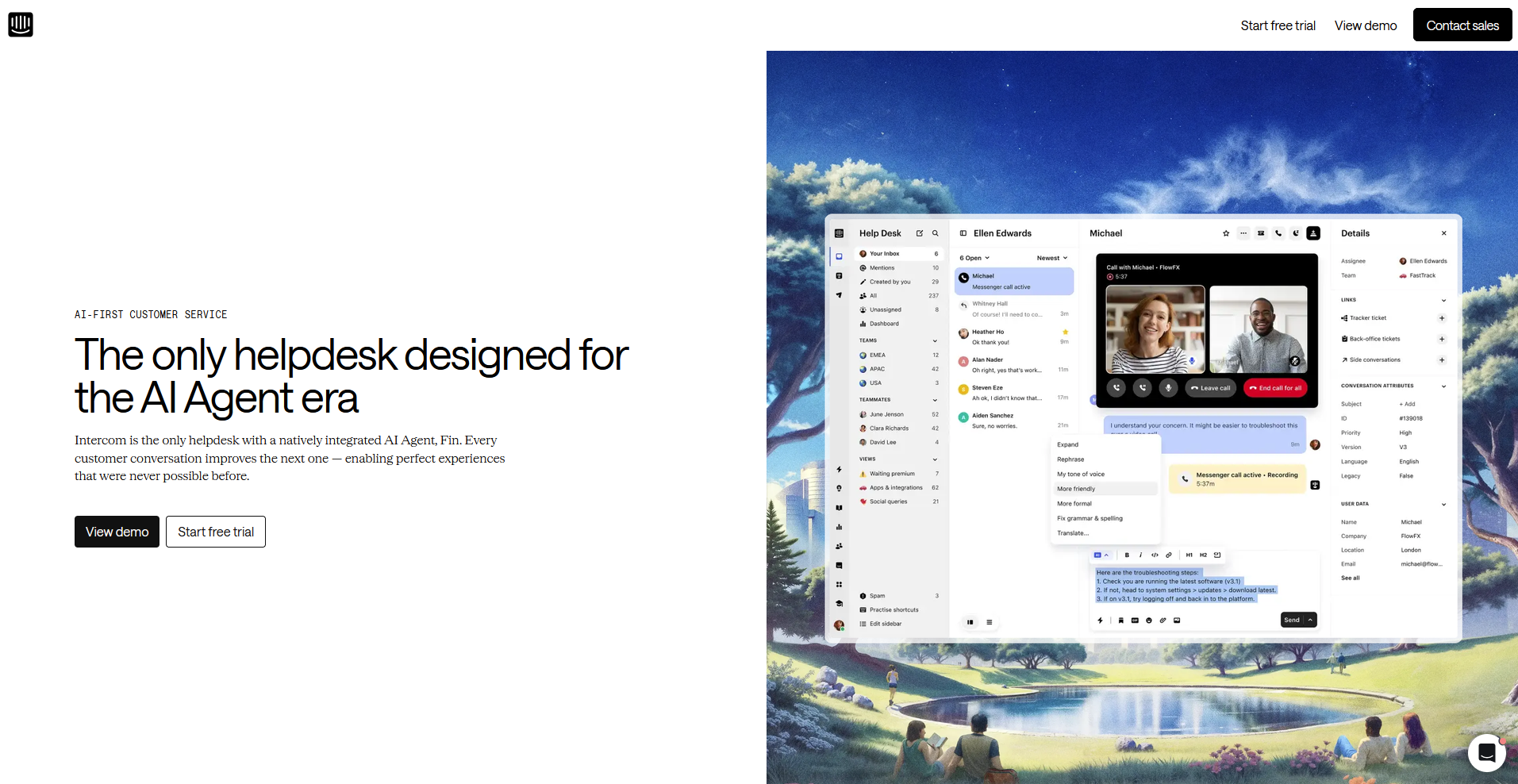
Fin, Intercom's AI agent, sits at the center of the workspace, resolving most conversations from the inbox and messenger before a human ever sees them.
Fin gets most of the attention, but a handful of other features do the actual day-to-day work.
- Fin AI agent: Intercom says Fin resolves an average of 76% of customer queries (vendor-reported figure), and it can take actions like issuing a refund through its "Procedures" feature instead of just answering questions.
- Messenger: A proactive, brandable chat widget that sits inside your product or website, built to feel native.
- Ticketing: A conversation-based system for tracking recurring issues and internal tasks. It's lighter than a traditional queue, since Intercom keeps the focus on the conversation.
- Fin AI Copilot: An AI layer that assists agents directly with suggested replies, translations, and tone adjustments inside the conversation.
- Knowledge base: Built into the messenger, so Fin can surface an article inline without the customer leaving the conversation.
- Reporting: High-level dashboards for conversational trends, built more for day-to-day monitoring than deep cross-team analysis.
Zendesk vs Intercom: at a glance
| Feature | Zendesk | Intercom |
|---|---|---|
| Best for | High-volume, multi-channel support teams that need structure and reporting | Product-led teams that want AI-first, conversational support |
| Starting price (billed annually) | $55/agent/month (Suite Team) | $29/seat/month (Essential) + $0.99 per Fin outcome |
| Key strength | Deep ticketing, reporting, and quality assurance built for scale | Fin AI agent and a messenger built to feel like part of the product |
| Main weakness | Setup can take real admin time to configure well | Fin's per-resolution fees can make costs hard to predict at scale |
| Ideal team size | Support teams handling thousands of tickets across channels | Small to mid-sized teams that want AI resolving common questions early |
Zendesk vs Intercom: side-by-side comparison
I ran the same three scenarios through both tools: a billing dispute, a bug report, and a password reset. That let me see how each one actually handled ticket routing, AI resolution, and reporting.
Here's how they stacked up:
1. Ticketing and workflow structure
Zendesk: Triggers and macros automate routine steps like status changes and tagging. Side conversations let you loop in another team inside a ticket instead of starting a new thread. The omnichannel workspace keeps email, chat, phone, and social in one view, so agents don't switch tools mid-ticket.
Intercom: Intercom has a ticketing system too, including a tracker for recurring issues and back-office tasks. It's lighter, since Intercom skips mandatory fields in favor of keeping the focus on the conversation. That works well at low volume and can feel too loose once a team is running hundreds of tickets a day with strict service-level agreements (SLAs).
Winner: Zendesk, for structured, high-volume ticketing.
2. Live chat and messaging
Zendesk: Messaging covers the basics like real-time replies and canned responses, but it doesn't offer the same branding or in-app placement options as Intercom's messenger.
Intercom: The messenger is proactive, brandable, and built to sit inside a product. AI writing help inside the chat lets agents translate messages, fix tone, and pull suggested replies without leaving the conversation.
Winner: Intercom, for teams that treat live chat as part of the product experience.
3. AI agents: Fin vs Zendesk AI
Note: Both companies lead with a resolution-rate number, worth treating as a starting point since each one is self-reported. The more useful comparison is what each AI does once it's live.
Zendesk AI: Copilot, a separate add-on available on Professional plans and higher, assists agents directly with suggested replies, summaries, and sentiment flags. The AI agent itself handles resolutions autonomously, with deeper setup generally needed to get full value from it.
Fin: Fin's "Procedures" feature can take actions like issuing a refund, so it can do more than answer questions. Fin Copilot covers the agent-assist side. It's a similar concept to Zendesk's Copilot, just built separately into Intercom's workspace.
Winner: It depends on volume and setup. Fin can get a team to value faster out of the box. Zendesk AI goes deeper once configured and folds in quality assurance that Fin doesn't have.
4. Knowledge base and self-service
Zendesk: Zendesk’s knowledge base is a standalone help center with a full article editor, categories, custom themes, and multilingual support, built to work as its own search-friendly site.
Intercom: The knowledge base lives inside the messenger, so Fin can surface an article without the customer leaving the conversation. That helps with deflection, though design customization is limited.
Winner: Tie. Zendesk for a standalone help center, Intercom for in-chat deflection.
5. Reporting and analytics
Zendesk: Zendesk Explore gives you pre-built dashboards and custom reports on response time, agent performance, and channel load, with forecasting built in. Some deeper reports sit behind higher-tier plans.
Intercom: Reporting is easy to read but shallower, built more for day-to-day monitoring than cross-team analysis.
Winner: Zendesk.
6. Integrations
Zendesk: Zendesk's marketplace lists 1,800+ apps, covering Salesforce, Jira, Shopify, Slack, and a long tail of niche tools.
Intercom: Intercom's catalog is smaller, weighted toward marketing, sales, and product tools.
Winner: Zendesk, on breadth of integrations.
7. Pricing
Zendesk: Zendesk's Suite plans cover full channel support plus AI, starting at $55/agent/month on Suite Team. For teams that only need ticketing, Zendesk also sells a cheaper plan called Support, starting at $19/agent/month.
Copilot, the agent-assist add-on, costs an extra $50/agent/month and requires Professional plans or higher. AI agent usage is billed per automated resolution, on top of the seat price.
Intercom: Seats run from $29/seat/month on Essential, with Advanced and Expert scaling up to $85 and $132/seat/month. Fin is billed separately at $0.99 per resolution, with no seat-based cap, so the total can climb well past the sticker price once a team leans on AI for real volume.
Winner: Zendesk, for forecasting. Seat price stays flat regardless of volume. Both platforms charge per AI resolution, but only Fin's $0.99 rate is public, so ask for Zendesk's exact number before comparing total cost.
What real users are saying
I pulled these highlights from verified G2 and Capterra reviews so you can see what Zendesk and Intercom users say beyond my own testing.
Let's take a look at what they're saying:
Zendesk
- Pros: Zendesk earns praise for pulling support work into one system. A software development engineer said it gives him a single place to track IT requests instead of chasing updates over chat. An enterprise SDET also said the unified workspace ties email, chat, and social into one view, with automation handling ticket routing and triggers.
- Cons: The feedback also points to a few rough edges. The same enterprise SDET said initial setup takes real time to configure, and a customer experience content team manager said many features are separate add-ons that raise cost as a team scales.
Intercom
- Pros: Intercom's messaging tools get consistent praise for keeping conversations organized. A customer support lead said the unified inbox helps her team stay organized and respond faster across channels, and a media production generalist said having everything grouped in one place makes replying quicker.
- Cons: The unified inbox comes with trade-offs, too. The same customer support lead said pricing can get steep as you scale into advanced features, and an executive chairman said the admin interface is feature-rich, so new support teams need time to learn it effectively.
Zendesk vs Intercom: How to make your choice
Zendesk comes out ahead for teams handling a high volume of tickets across channels, where structure, reporting, and predictable per-seat pricing matter more than a slick chat window.
Intercom is the better pick when a team wants an AI agent to resolve common questions out of the box and support that feels built into the product.
Your call comes down to how much structure your support operation needs and how much of that support you want AI handling before a human sees it.
Zendesk is better for:
- High-volume support teams: Teams clearing hundreds or thousands of tickets a day across email, chat, phone, and social from one workspace.
- Teams that need deep reporting: Anyone who wants pre-built dashboards, custom reports, and forecasting built into the platform.
- Predictable seat costs: Support operations that want a per-seat price that won't change no matter how many tickets come in.
Intercom is better for:
- Product-led teams: Companies that want support to feel like part of the product experience, so users don’t have to use a separate widget bolted onto a website.
- Teams wanting AI out of the box: Anyone who wants Fin to resolve common questions quickly, without a lengthy setup process first.
- Teams that want a lighter ticket structure: Support operations that want to skip mandatory fields and keep focus on the conversation.
Tip: Want to compare Zendesk with another tool? Check our Zendesk vs Freshdesk comparison.
What the Salesforce and Intercom deal means for buyers
There's a 2026 wrinkle worth naming here: Intercom rebranded to Fin in May 2026. The following month, Salesforce signed an agreement to acquire Fin. Zendesk's own comparison page brings this up often, but I'd read that page with some skepticism given the source.
For a buyer today, little changes day to day. The deal is signed but not yet closed, with Salesforce expecting it to complete in its fiscal Q4 2027 pending regulatory approval, and the product keeps shipping under the Intercom name most people still use.
A signed-but-not-closed acquisition rarely moves fast enough to affect a contract you're signing this quarter, but it's still a fair question to raise with a sales rep if you're locking into a multi-year term.
Ask directly about pricing commitments and integration support past the close date, since those are the two areas most likely to shift once a deal like this goes through.
My verdict
Between the two, I'd point most support teams toward Zendesk. It's built to handle volume without falling apart, and the reporting gives you a clear read on where a team is losing time. That structure is worth the setup effort once a team is clearing more than a handful of tickets a day.
But that doesn't mean Intercom is the wrong call for everyone.
For a product-led team that wants support to feel like part of the product, Fin resolving common questions out of the box is a real advantage, and the messenger looks and feels like something a customer would want to use. That's a strength I wouldn't hand to Zendesk, whose messaging still reads more like a backend tool than a feature.
If your team is scaling ticket volume across channels and wants predictable costs, choose Zendesk. If you're product-led, want AI answering questions from day one, and can live with a bill that moves with usage, Intercom earns its spot.
Support that knows your clients as well as you do
Zendesk and Intercom are built to support strangers at scale.
A professional-services firm has a different problem: a known, finite list of clients whose support questions come bundled with invoices, files, and project updates. Bouncing those clients to a separate support tool splits the relationship in two.
We built Assembly to solve that issue. Its AI app builder lets you build the client-facing support experience your firm needs, inside the same branded app where clients already handle invoices and files.
Here’s how Assembly can help:
- Build the support experience your firm needs: Skip adapting to Zendesk's or Intercom's fixed feature set. You can use Assembly’s app builder to build client support intake forms, a client-facing AI assistant, and a client resource library, shaped around how their own workflow runs.
- Keep it client-facing: What you build sits in the same space your clients already use, so nothing gets tucked away in an internal tool they never see.
- Connect support to the rest of the client experience: Link support directly to the invoices, files, and project updates a client already sees.
- Build your own version of what you're paying for elsewhere: Assembly’s app builder lets you build a client-facing tool that does the same job without the usage fees.
- Security holds up too: Assembly is SOC 2 Type II, HIPAA, and GDPR-compliant, so client data stays protected.
Try Assembly for free and build client support that sits alongside the rest of your work.